
A product catalogue gives businesses a practical way to present their products, share important information, and help customers understand what they offer. Whether it is used in a showroom, shared during a sales meeting, or distributed as a digital document, a well-organized catalogue design can make a brand look more professional and its products easier to explore.
However, effective catalogue design involves more than placing product images and descriptions on a series of pages. The layout, typography, image quality, product information, and brand identity all influence how customers experience the catalogue. When these elements work together, the final design becomes a useful marketing and sales resource rather than just a collection of product listings.
What Is Catalogue Design?
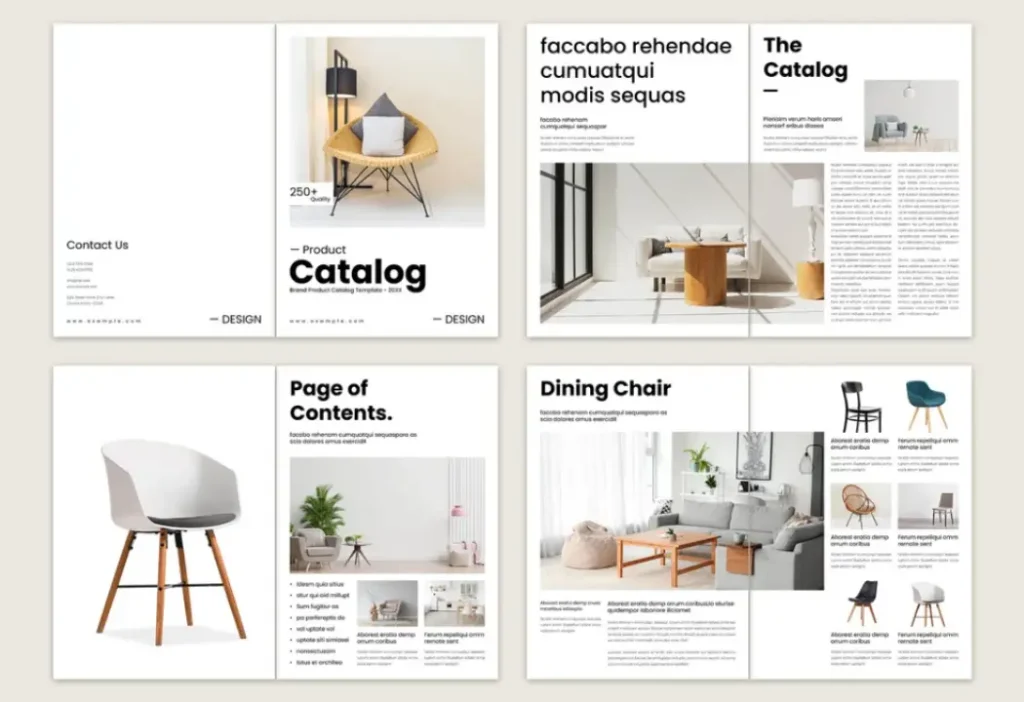
Catalogue design is the process of organizing product images, descriptions, specifications, and other relevant information into a clear and visually consistent format. It combines graphic design, information organization, and brand communication to help customers understand a product range without unnecessary effort.
A product catalogue may include product names, descriptions, sizes, colours, technical specifications, prices, or ordering details, depending on the business and its audience. For example, a furniture company may use large product photographs and material descriptions, while an industrial supplier may need detailed specifications and product codes.
The design should reflect the purpose of the catalogue and the needs of its readers. A retail catalogue may focus on visual appeal and product variety, whereas a business-to-business catalogue may prioritize technical details and easy product comparison.
Good catalogue design brings these elements together in a logical structure. Customers should be able to find relevant products, understand their features, and recognize the brand throughout the document.
Why Is Catalogue Design Important for Businesses?
A well-designed catalogue helps businesses present their products in a structured and professional way. It gives potential customers a clearer understanding of the available options and creates a consistent experience across different marketing and sales activities.
One important benefit is product presentation. High-quality images, readable descriptions, and organized categories help customers explore a product range more easily. Instead of searching through scattered information, they can compare relevant products within one document.
Catalogue design also supports brand consistency. When the colours, typography, imagery, and overall layout follow the same visual identity as the business’s other marketing materials, the catalogue becomes a recognizable part of the brand. This is particularly useful for companies that regularly share product information with customers, distributors, or business partners.
A catalogue can also support sales conversations. Sales teams may use it during meetings, exhibitions, and customer consultations to explain product options and answer questions. A digital version can be shared through email or other communication channels, making product information easier to distribute.
Although a catalogue alone cannot guarantee additional sales, a clear and professional presentation can help customers understand the offering and make informed decisions.
What Are the Main Types of Product Catalogues?
Businesses can choose from different catalogue formats depending on their products, audience, distribution methods, and marketing goals. The most common options include printed, digital, and business-to-business catalogues.
Printed Product Catalogue Design
Printed catalogues present product information in a physical format, usually as a booklet, brochure, or multi-page publication. Businesses may distribute them in retail stores, showrooms, exhibitions, trade fairs, and sales meetings.
The design of a printed catalogue requires careful attention to page dimensions, margins, image resolution, typography, paper selection, and binding. Product images should remain clear when printed, while text must be readable at the final page size.
Page flow is equally important. Product categories should follow a logical sequence, and related items should be grouped in ways that help readers navigate the publication. The cover should establish the catalogue’s visual direction, while the inside pages should maintain a consistent layout.
Printed catalogues can be particularly useful when customers need a physical reference during product selection or face-to-face discussions.

Digital Product Catalogue Design
Digital catalogue design focuses on presenting products through formats such as PDFs, downloadable documents, or online catalogue pages. These formats allow businesses to distribute product information without requiring a physical print run.
A digital catalogue should be easy to open, navigate, read, and share. File size matters because very large documents can be inconvenient to download, particularly on slower connections. Text should remain readable on different screens, and clickable links can help readers reach product pages, websites, or enquiry forms.
Some businesses update digital catalogues more frequently than printed versions because product information, prices, and availability can change. Maintaining accurate information is therefore an important part of the process.
The design should also consider mobile users. Many customers open documents on their phones, so small text, crowded layouts, and overly wide pages can make the catalogue difficult to use.

B2B and Wholesale Catalogues Design
Business-to-business (B2B) and wholesale catalogues are designed for professional buyers, retailers, distributors, and other organizations that purchase products for commercial purposes.
These catalogues often require more detailed product information than consumer-focused publications. Depending on the industry, they may include product codes, dimensions, materials, available variations, technical specifications, minimum order quantities, or wholesale pricing.
Organization is especially important when a catalogue contains a large number of products. Consistent category labels, tables, product codes, and specification formats help buyers locate the information they need.
For these catalogues, visual appeal should support usability rather than compete with it. A clean, systematic layout makes it easier to compare products and identify relevant details.
What Makes an Effective Product Catalogue Design?
A professional product catalogue depends on several design elements working together. Each element should improve the way products are presented while maintaining a consistent experience for the reader.
Clear Layout and Product Organization
A clear layout helps readers move through the catalogue without confusion. Product categories, headings, spacing, and page structure should follow a consistent system so customers know where to look for specific information.
Related products can be grouped together, while category headings and visual dividers can help separate different sections. A balanced grid creates order and prevents individual pages from feeling crowded.
The layout should also give products enough space to stand out. Placing too many items on one page may make the catalogue difficult to scan, while excessive empty space can reduce the amount of useful information presented. The right balance depends on the product range and the purpose of the publication.
High-Quality Product Images
Product images are often among the first elements readers notice. Clear and consistent photography helps customers understand a product’s appearance, finish, shape, and important visual details.
Images should be suitable for the final format and maintain sufficient resolution for print or digital display. Consistent backgrounds, lighting, cropping, and image proportions can make the overall catalogue look more organized.
Image selection should also reflect the products accurately. Decorative visuals can support the presentation, but they should not distract from the item being described or create a misleading impression of its features.
For products with several variations, additional images may be useful to show different colours, angles, components, or finishes.
Readable Typography and Product Information
Typography influences both the appearance and usability of a catalogue. Product names, headings, descriptions, and specifications should have a clear visual hierarchy so readers can distinguish between different types of information.
A limited selection of complementary fonts usually creates a more consistent result than using many unrelated typefaces. Font sizes, line spacing, and text contrast should support comfortable reading across the intended format.
Product descriptions should be informative without becoming unnecessarily long. Important details need to be easy to locate, particularly when customers are comparing similar products. Specifications can be presented in structured lists or tables when that makes the information easier to scan.
Accurate spelling, measurements, product names, and technical details are just as important as the visual design. Errors can create confusion and may reduce confidence in the business.
Clear Calls to Action and Contact Details
A catalogue should make it clear what readers can do after reviewing the products. Depending on the business model, this may involve requesting a quotation, contacting a sales representative, visiting a website, or placing an order.
Relevant contact information can include a website address, email, telephone number, or QR code. Digital catalogues may also use clickable links to direct readers to product pages or enquiry forms.
Calls to action should be noticeable without overwhelming the product presentation. Their placement and wording should reflect the reader’s next likely step.
How to Create a Professional Product Catalogue
Creating a catalogue becomes easier when the process follows a clear sequence. Planning the content before designing individual pages helps reduce inconsistencies and makes revisions more manageable.
Define the Catalogue's Purpose and Audience
Start by identifying why the catalogue is being created and who will use it. A catalogue intended for retail customers may need attractive photography and concise descriptions, while one created for distributors may require detailed specifications and ordering information.
The audience also influences the format, tone, page structure, and amount of information included. Establishing these requirements early gives the design process a clear direction.
Plan the Layout and Page Structure
Once the content is organized, establish the catalogue’s visual system. This includes page dimensions, margins, typography, image placement, category headings, colours, and recurring design elements.
A sample page or initial layout can help test whether the design works before it is applied to the full catalogue. It also provides an opportunity to review readability, product spacing, and information hierarchy.
The design should remain flexible enough to accommodate different product images and descriptions without losing consistency.
Design, Review, and Prepare the Final Catalogue
After the layout is developed, review the catalogue for both design quality and content accuracy. Check product names, descriptions, prices, specifications, contact details, image quality, and page numbering.
For printed catalogues, confirm the required dimensions, bleed, margins, colour settings, and resolution with the printer. For digital catalogues, test links, check file size, and review readability on different screen sizes.
A final proofread can help catch errors that may have been overlooked during design. Reviewing the complete document as a reader would also reveal whether the products are easy to find and the information follows a logical order.
Frequently Asked Questions
A good product catalogue combines clear organization, accurate product information, high-quality images, readable typography, and consistent branding. It should help customers find products and understand their features without unnecessary effort.
The choice depends on how customers will access and use the catalogue. Printed formats can be useful for physical presentations and exhibitions, while digital formats are convenient for online distribution and updates. Some businesses use both.
Most catalogues include product names, descriptions, images, and relevant specifications. Depending on the business, they may also include prices, product codes, available variations, ordering instructions, and contact details.
Professional catalogue design helps businesses present products clearly, maintain brand consistency, and organize information effectively. A well-planned design can make product details easier to understand and support a more professional customer experience.
Conclusion
Effective catalogue design brings product information, images, layout, and branding together in a way that helps customers explore a business’s offerings. The strongest catalogues are organized around the needs of their audience, with accurate information and a consistent visual style across every page.
Whether a business needs a printed publication, a digital product catalogue, or a detailed wholesale guide, careful planning makes the final result more useful and professional. By focusing on clarity, usability, and brand consistency, businesses can create catalogues that support product communication and fit naturally into their wider marketing efforts.
Explore Creative Plus Branding Services to learn more about its branding capabilities. Businesses looking to discuss a design project can also Contact Us.